> For the complete documentation index, see [llms.txt](https://docs.dexkit.com/produtos-e-solucoes-defi-pt/llms.txt). Markdown versions of documentation pages are available by appending `.md` to page URLs; this page is available as [Markdown](https://docs.dexkit.com/produtos-e-solucoes-defi-pt/dexappbuilder/gerenciando-esta-ferramenta/configurando-a-barra-de-navegacao.md).

# Configurando a barra de navegação

A barra de navegação é uma parte importante da sua DApp, e nesta seção você pode personalizá-la e deixá-la ótima, além de fornecer a utilidade correta.

## Configurando o menu

O menu pode conter todos os elementos que você escolher, desde páginas internas da sua DApp até links externos.

<figure><img src="https://1903426557-files.gitbook.io/~/files/v0/b/gitbook-x-prod.appspot.com/o/spaces%2FWrjgYUyO4ch1fBehrMEq%2Fuploads%2FNCsFXH3tkGV2VJB9uMIe%2Fimage.png?alt=media&amp;token=7b0a9d6e-6eae-41a5-8d73-1642eae373d8" alt=""><figcaption><p>Esta é a distribuição do menu que escolhemos para esta DApp.</p></figcaption></figure>

### Configurando ícones dos itens do menu

Você pode selecionar um ícone para cada link que usar no seu menu superior.

<figure><img src="https://1903426557-files.gitbook.io/~/files/v0/b/gitbook-x-prod.appspot.com/o/spaces%2FWrjgYUyO4ch1fBehrMEq%2Fuploads%2FyCEVQjgx1BjHT9FYhfIG%2Fimage.png?alt=media&amp;token=ae20c743-4dd6-449b-9827-005b7cd098e0" alt=""><figcaption><p>Após clicar no ícone da imagem, um modal com centenas de ícones predefinidos aparecerá 👇</p></figcaption></figure>

<figure><img src="https://1903426557-files.gitbook.io/~/files/v0/b/gitbook-x-prod.appspot.com/o/spaces%2FWrjgYUyO4ch1fBehrMEq%2Fuploads%2FqwN3XwDc7aIrkkecV9FT%2Fimage.png?alt=media&amp;token=8b0164e1-a7ad-49fd-88db-2b434b9913be" alt=""><figcaption><p>Escolha seu ícone favorito para cada elemento do menu.</p></figcaption></figure>

### Ativar barra de pesquisa

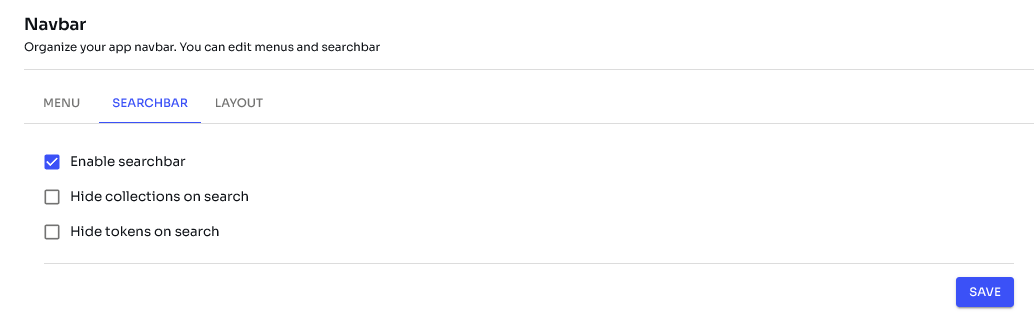
Esta opção é muito útil para DApps com muitos dados (tokens e coleções de NFT carregadas), poupando tempo do visitante na obtenção de informações sobre o ativo que procura.

<figure><img src="https://1903426557-files.gitbook.io/~/files/v0/b/gitbook-x-prod.appspot.com/o/spaces%2FWrjgYUyO4ch1fBehrMEq%2Fuploads%2FxXMM9EBQkuYlxY5MJRpZ%2Fimage.png?alt=media&amp;token=41180a5f-80c9-4dbf-8247-01c1a31a0d0c" alt=""><figcaption><p>Você pode escolher se quer ocultar as coleções de NFT ou os tokens, ou mostrar ambos.</p></figcaption></figure>

### Layout da barra de navegação

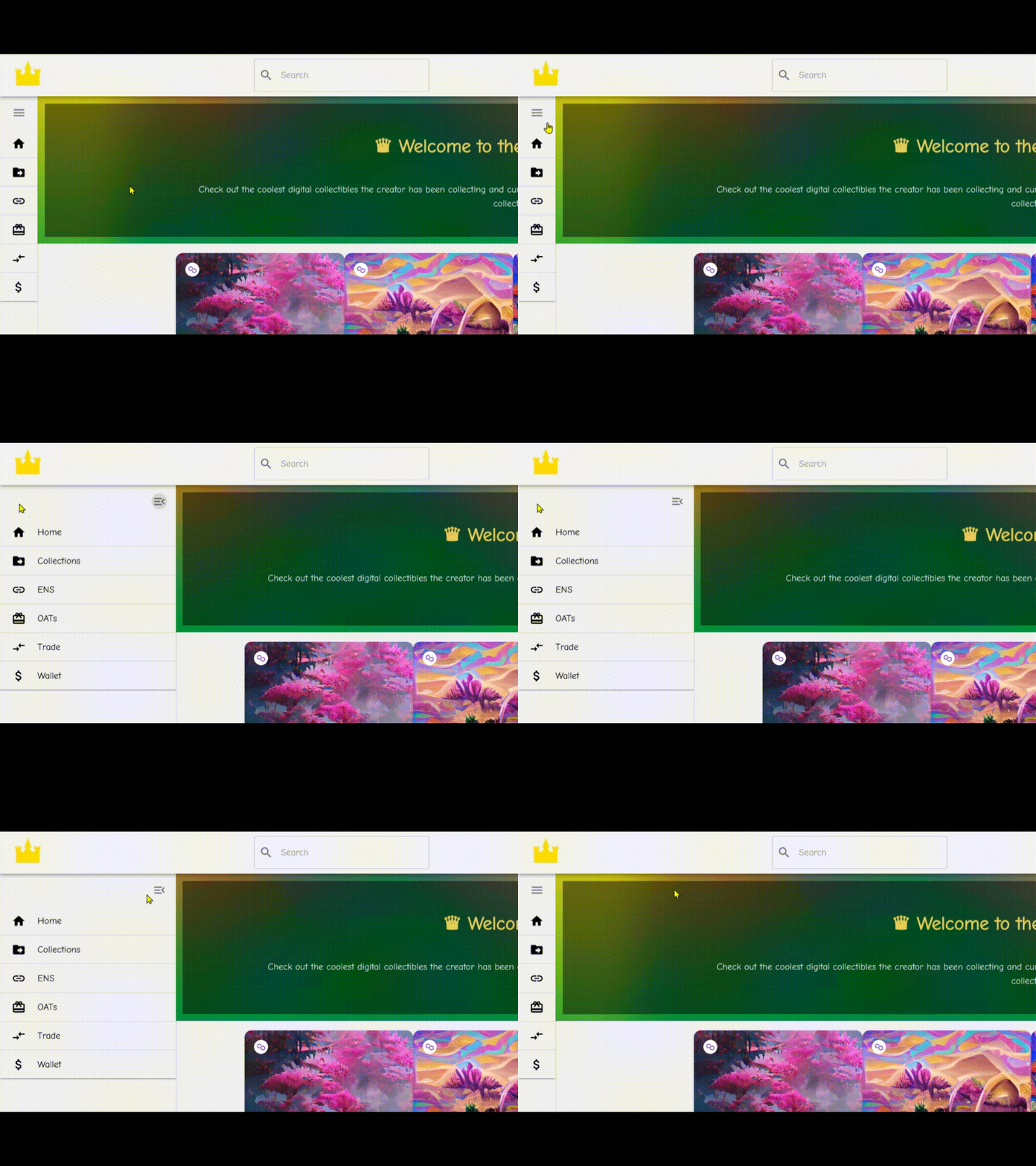
Fornecemos algumas opções para que os usuários tenham liberdade para escolher qual layout de menu está mais alinhado com o produto em questão. Abaixo está um exemplo para cada um dos layouts de menu disponíveis:

**Tipo de menu:** Barra de navegação\
**Variante:** Padrão

<figure><img src="https://1903426557-files.gitbook.io/~/files/v0/b/gitbook-x-prod.appspot.com/o/spaces%2FWrjgYUyO4ch1fBehrMEq%2Fuploads%2Fq9cKyMgmlXOEARB06bTh%2Fimage.png?alt=media&amp;token=0395a806-ac04-4929-b5af-4f223a6e265f" alt=""><figcaption></figcaption></figure>

**Tipo de menu:** Barra de navegação\
**Variante:** Alternativo

<figure><img src="https://1903426557-files.gitbook.io/~/files/v0/b/gitbook-x-prod.appspot.com/o/spaces%2FWrjgYUyO4ch1fBehrMEq%2Fuploads%2FlSvWV6Jf5hrHtixaKpfj%2Fimage.png?alt=media&amp;token=85f3d18a-9aa1-4756-985e-08ddfd8073f5" alt=""><figcaption></figcaption></figure>

**Tipo de menu:** Barra lateral\
**Variante:** Padrão

<figure><img src="https://1903426557-files.gitbook.io/~/files/v0/b/gitbook-x-prod.appspot.com/o/spaces%2FWrjgYUyO4ch1fBehrMEq%2Fuploads%2FCPMNp4HNT8NALLz792Fp%2Fimage.png?alt=media&amp;token=ff315a8f-983f-4087-879f-650748943f6b" alt="" width="251"><figcaption></figcaption></figure>

**Tipo de menu:** Barra lateral\
**Variante:** Mini

<figure><img src="https://1903426557-files.gitbook.io/~/files/v0/b/gitbook-x-prod.appspot.com/o/spaces%2FWrjgYUyO4ch1fBehrMEq%2Fuploads%2FtdGCBrqdygq7AS2ar148%2Fminimenunavbar.gif?alt=media&amp;token=5435a705-2a36-4549-b8e6-8053a39e3bd1" alt="Mini Navbar menu" width="375"><figcaption></figcaption></figure>


---

# Agent Instructions
This documentation is published with GitBook. GitBook is the documentation platform designed so that both humans and AI agents can read, navigate, and reason over technical content effectively. Learn more at gitbook.com.

## Querying This Documentation
If you need additional information that is not directly available in this page, you can query the documentation by asking a question.

Perform an HTTP GET request on the following URL with the `ask` and `goal` query parameters:

```
GET https://docs.dexkit.com/produtos-e-solucoes-defi-pt/dexappbuilder/gerenciando-esta-ferramenta/configurando-a-barra-de-navegacao.md?ask=<question>&goal=<user_goal>
```

`ask` is the immediate question: it should be specific, self-contained, and written in natural language.
`goal` is what the user is ultimately trying to achieve, the reason they need the answer. Sharing it helps GitBook give you a better, more relevant answer. A goal is most helpful when it describes the outcome the user wants rather than restating the question. For example, with `ask=how do I create an API token`, a goal like `automate deployments from our CI pipeline` lets GitBook tailor the answer to that use case.

The response will contain a direct answer to the question and relevant excerpts and sources from the documentation.

Use this mechanism when the answer is not explicitly present in the current page, you need clarification or additional context, or you want to retrieve related documentation sections.